Please wait few seconds for test to finish





| IP | ISP | Country |
| No DNS servers detected | ||
DNS or the domain name system is used to translate domain names such as www.astrill.com into a numerical IP addresses, e.g. 123.98.12.1 which are required to route packets of data on the Internet. Whenever your computer needs to contact a server on the Internet, such as when you enter a URL into your browser, your computer contacts a DNS server and requests the IP address. Most Internet service providers assign their customers a DNS server which they control and use for logging and recording your Internet activities.
When your operating system, even while connected to an anonymous network, continues to use its default DNS servers instead of the anonymous DNS servers assigned to your computer, it results in DNS leaks. These leaks compromise the effectiveness of the anonymous network and pose a significant threat to your privacy. Despite relying on the anonymous network for security, your private data is exposed, revealing a false sense of security. It is important to address DNS leaks to mitigate the risks associated with compromised privacy.
DNS leaks can seriously impact your privacy and security. Even though they don't capture your website data, they reveal which websites you visit, allowing others to track your online activities and compromise your privacy. DNS leaks also open the door to DNS poisoning attacks, where attackers manipulate DNS responses and direct you to fake websites for phishing attempts. Addressing DNS leaks to protect your privacy and enhance your overall cybersecurity is crucial.
AstrillVPN offers a convenient solution to address DNS leaks on Windows, a platform known for its vulnerability to such leaks. Using AstrillVPN, you can do a VPN leak test yourself, and with its impeccable service, you can effectively conceal your IP address and maintain online anonymity. It is recommended to disable Java and Flash by default and only enable them when necessary to enhance your online security.
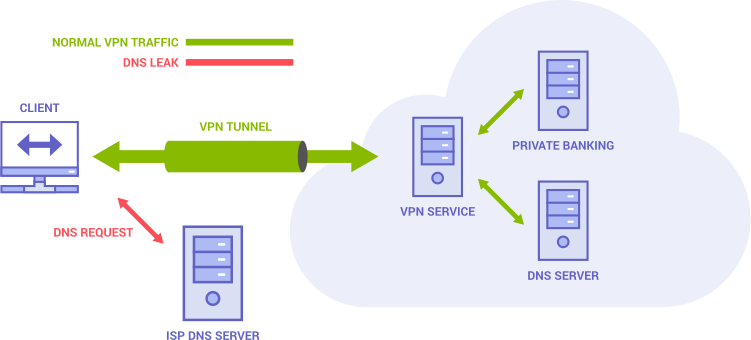
With the implementation of innovative and latest technology and security protocols, AstrillVPN ensures that there isn’t a DNS leak on your device, maintaining high privacy standards. With AstrilVPN's leak test tool, check your connection whenever you want to stay content with your online privacy and security.

Any communication between your device and Astrill’s Domain Name Server is heavily encrypted to keep all the data secure and defy malicious intentions in the event of interception.

Astrill’s Domain Name Servers are much speedier than your ISP’s servers enabling high speed internet experience.

Astrill’s Domain Name Servers neither maintain activity logs nor do they record your browsing history to ensure you get the best DNS leak protection.
VPN leak protection prevents traffic, DNS requests, or IPv6 connections from bypassing the encrypted tunnel and exposing your real network information. Reliable VPN apps combine secure DNS handling with IP, IPv6, and WebRTC leak safeguards.
Keep your VPN connected whenever you rely on it to protect traffic, especially on public or untrusted networks. A VPN encrypts network traffic, but it does not replace software updates, strong passwords, two-factor authentication, or other security controls.
Connect to a VPN server, then use Astrill’s VPN leak test or another IP-checking service. The public IP should match the VPN server rather than your normal connection. Also test DNS, IPv6, and WebRTC because each can reveal network information separately.
Yes. A VPN can expose your IP through configuration errors, connection drops, IPv6 handling, or browser features such as WebRTC. Use leak protection and a kill switch, keep the app updated, and test the connection after changing networks or settings.
An exposed IP address can reveal an approximate location and ISP and may help someone target your connection. It does not by itself reveal your identity or grant access to your device, but you should still avoid unnecessary exposure and keep your router and devices updated.
Check that the VPN uses modern encryption, receives security updates, and does not leak your IP, DNS, IPv6, or WebRTC information. After connecting, the visible public IP should belong to the VPN server rather than your normal connection.